8.2 自訂 Git-Git 屬性
Git Attributes
還可以為路徑指定其中的一些設置, 以便 Git 僅將這些設置應用於子目錄或檔子集。這些特定于路徑的設置稱為 Git 屬性, 如果不需要屬性檔
.gitattributes , 則在您的一個目錄 (通常是專案的根) 中的. git征屬性檔中進行設置, 或者在. .git/info/attributes檔中設置與您的專案承諾。
使用屬性, 您可以執行以下操作: 為專案中的單個檔或目錄指定單獨的合併策略, 告訴 Git 如何劃分非文字檔, 或者在將其簽入或簽出 Git 之前, 讓 Git 篩選內容。在本節中, 您將瞭解可以在 Git 專案中的路徑上設置的一些屬性, 並查看在實踐中使用此功能的幾個示例。
二進位檔案
一個很酷的技巧, 你可以使用 Git 屬性是告訴 Git 哪些檔是二進位的 (在情況下, 否則它可能無法弄清楚), 並給 Git 有關如何處理這些檔的特別說明。例如, 某些文字檔可能是機器生成的, 無法傳播, 而某些二進位檔案則可以分散。你會看到如何告訴 Git 哪個是哪個。
識別二進位檔案
有些檔看起來像文字檔, 但出於各種意圖和目的, 將被視為二進位資料。例如, Mac 上的 Xcode 專案包含一個
.pbxproj檔, 該檔基本上是由 ide 寫入磁片的 json (純文字 JavaScript 資料格式) 資料集, 它記錄您的生成設置等。雖然從技術上講, 它是一個文字檔 (因為它都是 UTF-8), 但您不想將其視為一個羽量級資料庫, 但如果兩個人更改了它, 則無法合併內容, 而且差異通常沒有説明。該檔是由電腦使用的。實質上, 您希望將其視為二進位檔案。
若要告訴 Git 將所有
pbxproj檔視為二進位資料, 請將以下行.gitattributes檔中:*.pbxproj binary
現在, Git 不會嘗試轉換或修復 CRLF 問題;當您在專案上運行
git show或git diff, 它也不會嘗試計算或列印此檔中的更改差異。填充二進位檔案
您還可以使用 Git 屬性功能來有效地差異二進位檔案。您可以通過告訴 Git 如何將二進位資料轉換為文本格式, 可以通過正常的差異進行比較。
首先, 您將使用此技術來解決人類已知的最煩人的問題之一: 版本控制 Microsoft Word 文檔。每個人都知道 word 是周圍最可怕的編輯, 但奇怪的是, 每個人仍然使用它。如果要對 word 文檔進行版本控制, 可以將它們粘貼到 Git 存儲庫中, 並每隔一段時間提交一次。但這又有什麼用呢?如果您正常運行
git diff則只能看到如下內容:$ git diff
diff --git a/chapter1.docx b/chapter1.docx
index 88839c4..4afcb7c 100644
Binary files a/chapter1.docx and b/chapter1.docx differ
你不能直接比較兩個版本, 除非你簽出和手動掃描它們, 對不對?事實證明, 你可以使用 Git 屬性相當好地做到這一點。在
.gitattributes檔中放置以下行:*.docx diff=word
這告訴 Git, 當您嘗試查看包含更改的差異時, 與此模式 (
.docx) 匹配的任何檔都應使用 "word" 篩選器。什麼是 "字" 篩檢程式?你必須把它設置好。在這裡, 您將配置 Gitdocx2txt程式將 word 文檔轉換為可讀的文字檔, 然後它將正確地分解這些檔。
首先, 您需要安裝
docx2txt;你可以從HTTP://docx2txt.sourceforge.net下載。按照INSTALL檔中的說明將其放置在 shell 可以找到的位置。接下來, 您將編寫一個包裝腳本, 將輸出轉換為 Git 所期望的格式。創建路徑中某個名為docx2txt的檔, 並添加以下內容:#!/bin/bash
docx2txt.pl $1 -
不要忘
chmod a+x該檔。最後, 您可以將 Git 配置為使用此腳本:$ git config diff.word.textconv docx2txt
現在 Git 知道, 如果它試圖在兩個快照之間進行差異化, 並且任何檔都以
.docxdocx 結尾, 則應通過 "word" 篩選器運行這些檔, 該篩選器被定義為docx2txt程式。這有效地使良好的基於文本的版本, 您的 Word 檔, 然後再嘗試差異它們。
下面是一個示例: 本書的第1章被轉換為 Word 格式並提交到 Git 存儲庫中。然後添加了一個新段落。下面是
git diff的內容:$ git diff
diff --git a/chapter1.docx b/chapter1.docx
index 0b013ca..ba25db5 100644
--- a/chapter1.docx
+++ b/chapter1.docx
@@ -2,6 +2,7 @@
This chapter will be about getting started with Git. We will begin at the beginning by explaining some background on version control tools, then move on to how to get Git running on your system and finally how to get it setup to start working with. At the end of this chapter you should understand why Git is around, why you should use it and you should be all setup to do so.
1.1. About Version Control
What is "version control", and why should you care? Version control is a system that records changes to a file or set of files over time so that you can recall specific versions later. For the examples in this book you will use software source code as the files being version controlled, though in reality you can do this with nearly any type of file on a computer.
+Testing: 1, 2, 3.
If you are a graphic or web designer and want to keep every version of an image or layout (which you would most certainly want to), a Version Control System (VCS) is a very wise thing to use. It allows you to revert files back to a previous state, revert the entire project back to a previous state, compare changes over time, see who last modified something that might be causing a problem, who introduced an issue and when, and more. Using a VCS also generally means that if you screw things up or lose files, you can easily recover. In addition, you get all this for very little overhead.
1.1.1. Local Version Control Systems
Many people's version-control method of choice is to copy files into another directory (perhaps a time-stamped directory, if they're clever). This approach is very common because it is so simple, but it is also incredibly error prone. It is easy to forget which directory you're in and accidentally write to the wrong file or copy over files you don't mean to.
Git 成功而簡潔地告訴我們, 我們添加了字串 "測試: 1, 2, 3.", 這是正確的。這並不完美--格式更改不會顯示在這裡--但它肯定有效。
另一個有趣的問題, 你可以通過這種方式解決涉及分散影像檔。執行此操作的一種方法是通過提取其 EXIF 資訊 (使用大多數圖像格式記錄的中繼資料) 的篩選器運行影像檔。如果您下載並安裝
exiftool程式, 則可以使用它將圖像轉換為有關中繼資料的文本, 因此至少 diff 會向您顯示所發生的任何更改的文本表示形式。在.gitattributes檔中放置以下行:*.png diff=exif
將 Git 配置為使用此工具:
$ git config diff.exif.textconv exiftool
如果替換專案中的圖像並運行
git diff則會看到如下內容:diff --git a/image.png b/image.png
index 88839c4..4afcb7c 100644
--- a/image.png
+++ b/image.png
@@ -1,12 +1,12 @@
ExifTool Version Number : 7.74
-File Size : 70 kB
-File Modification Date/Time : 2009:04:21 07:02:45-07:00
+File Size : 94 kB
+File Modification Date/Time : 2009:04:21 07:02:43-07:00
File Type : PNG
MIME Type : image/png
-Image Width : 1058
-Image Height : 889
+Image Width : 1056
+Image Height : 827
Bit Depth : 8
Color Type : RGB with Alpha
You can easily see that the file size and image dimensions have both changed.
Keyword Expansion
SVN- or CVS-style keyword expansion is often requested by developers used to those systems. The main problem with this in Git is that you can’t modify a file with information about the commit after you’ve committed, because Git checksums the file first. However, you can inject text into a file when it’s checked out and remove it again before it’s added to a commit. Git attributes offers you two ways to do this.
First, you can inject the SHA-1 checksum of a blob into an
$Id$ field in the file automatically. If you set this attribute on a file or set of files, then the next time you check out that branch, Git will replace that field with the SHA-1 of the blob. It’s important to notice that it isn’t the SHA-1 of the commit, but of the blob itself. Put the following line in your .gitattributes file:*.txt ident
Add an
$Id$ reference to a test file:$ echo '$Id$' > test.txt
The next time you check out this file, Git injects the SHA-1 of the blob:
$ rm test.txt
$ git checkout -- test.txt
$ cat test.txt
$Id: 42812b7653c7b88933f8a9d6cad0ca16714b9bb3 $
However, that result is of limited use. If you’ve used keyword substitution in CVS or Subversion, you can include a datestamp – the SHA-1 isn’t all that helpful, because it’s fairly random and you can’t tell if one SHA-1 is older or newer than another just by looking at them.
It turns out that you can write your own filters for doing substitutions in files on commit/checkout. These are called “clean” and “smudge” filters. In the
.gitattributes file, you can set a filter for particular paths and then set up scripts that will process files just before they’re checked out (“smudge”, see The “smudge” filter is run on checkout.) and just before they’re staged (“clean”, see The “clean” filter is run when files are staged.). These filters can be set to do all sorts of fun things.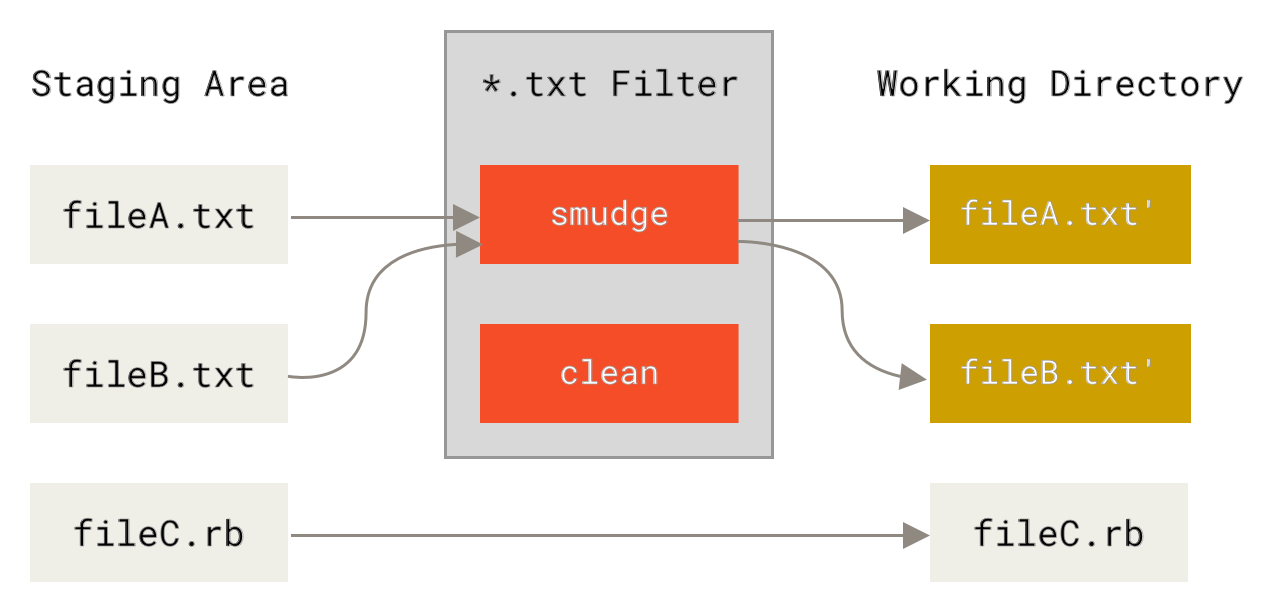
圖表 143. The “smudge” filter is run on checkout.
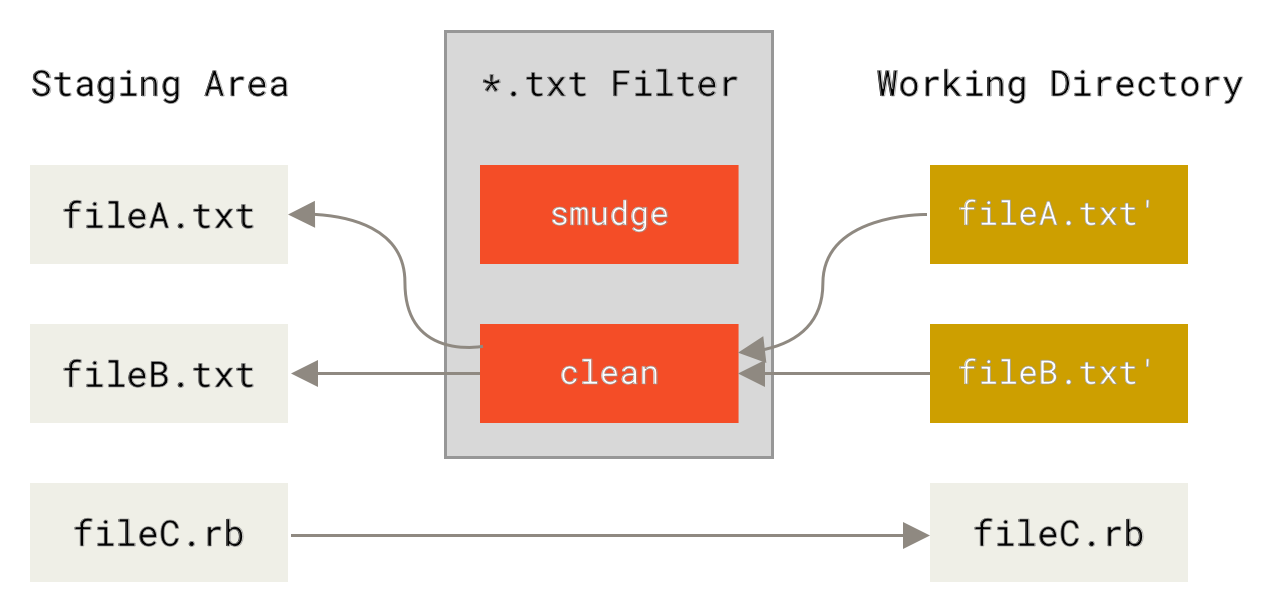
表144。在暫存檔時運行 "乾淨" 篩選器。
此功能的原始提交消息提供了一個簡單的示例, 說明在提交之前, 通過
indent程式運行所有 c 原始程式碼。您可以通過在.gitattributes檔中設置篩選器屬性來設置它, 以便使用 "縮進" 篩選器篩選*.c c 檔:*.c filter=indent
然後, 告訴 Git "縮進" 篩檢程式在汙跡和清潔上的作用:
$ git config --global filter.indent.clean indent
$ git config --global filter.indent.smudge cat
在這種情況下, 當您提交與
*.cc 匹配的檔時, git 將在對它們進行階段處理之前通過縮進程式運行它們, 然後在將它們簽回磁片之前通過cat程式運行它們。cat程式基本上什麼都不做: 它吐出的資料和它進來的資料是一樣的。這種組合有效地過濾所有 C 原始程式碼檔通過indent提交之前。
另一個有趣的例子是
$Date$關鍵字擴展, rcs 樣式。要正確地做到這一點, 您需要一個小腳本, 它採用檔案名, 計算出此專案的最後一個提交日期, 並將日期插入到檔中。下面是一個小 Ruby 腳本, 它可以做到這一點:#! /usr/bin/env ruby
data = STDIN.read
last_date = `git log --pretty=format:"%ad" -1`
puts data.gsub('$Date$', '$Date: ' + last_date.to_s + '$')
腳本所做的只是從
git log命令中獲取最新的提交日期, 將其粘貼到 stdin 中看到的任何$Date$字串中, 並列印結果--使用您最熟悉的語言執行操作應該很簡單。您可以將此檔expand_date您的路徑。現在, 您需要在 Git 中設置一個篩選器 (稱為dater), 並告訴它使用expand_date篩選器在簽出時弄髒檔。您將使用 Perl 運算式在提交時清理該運算式:$ git config filter.dater.smudge expand_date
$ git config filter.dater.clean 'perl -pe "s/\\\$Date[^\\\$]*\\\$/\\\$Date\\\$/"'
此 Perl 程式碼片段刪除了它在
$Date$字串中看到的任何內容, 以返回到您開始的位置。現在, 您的篩選器已準備就緒, 您可以通過為該檔設置一個 Git 屬性來對其進行測試, 該屬性將與新篩選器一起使用, 並創建一個$Date$關鍵字的檔:date*.txt filter=dater$ echo '# $Date$' > date_test.txt
如果您提交這些更改並再次簽出該檔, 您將看到正確替換的關鍵字:
$ git add date_test.txt .gitattributes
$ git commit -m "Testing date expansion in Git"
$ rm date_test.txt
$ git checkout date_test.txt
$ cat date_test.txt
# $Date: Tue Apr 21 07:26:52 2009 -0700$
您可以看到此技術對於自訂應用程式的功能有多強大。不過, 您必須小心, 因為
.gitattributes檔是在專案中提交和傳遞的, 但驅動程式 (在本例中為dater) 不是, 因此它不會在任何地方工作。在設計這些篩選器時, 它們應該能夠正常失敗, 並使專案仍然正常工作。匯出您的存儲庫
Git 屬性資料還允許您在匯出專案存檔時執行一些有趣的操作。
export-ignore
您可以告訴 Git 在生成存檔時不要匯出某些檔或目錄。如果有一個子目錄或檔不希望包含在存檔檔中, 但您確實希望簽入專案, 則可以通過
export-ignore確定這些檔。
例如, 假設您在
test/子目錄中有一些測試檔案, 而將它們包含在專案的 tarball 匯出中是沒有意義的。您可以將以下行添加到 Git 屬性檔中:test/ export-ignore
現在, 當您運行 git 歸檔檔以創建專案的 tarball 時, 該目錄將不會包含在存檔中。
export-subst
匯出要部署的檔時, 可以
git log格式和關鍵字擴展處理應用於標記為匯出export-subst屬性的檔的選定部分。
例如, 如果要在專案中包含一個名為
LAST_COMMIT的檔, 並且在git archive運行時自動向其注入有關最後一次提交的中繼資料, 則可以例如設置. git無能為力.gitattributes和LAST_COMMIT檔, 如下所示:LAST_COMMIT export-subst$ echo 'Last commit date: $Format:%cd by %aN$' > LAST_COMMIT
$ git add LAST_COMMIT .gitattributes
$ git commit -am 'adding LAST_COMMIT file for archives'
運行
git archive時, 存檔檔的內容將如下所示:$ git archive HEAD | tar xCf ../deployment-testing -
$ cat ../deployment-testing/LAST_COMMIT
Last commit date: Tue Apr 21 08:38:48 2009 -0700 by Scott Chacon
替換可以包括例如提交消息和任何 git 注釋, git 日誌可以執行簡單的換行:
$ echo '$Format:Last commit: %h by %aN at %cd%n%+w(76,6,9)%B$' > LAST_COMMIT
$ git commit -am 'export-subst uses git log's custom formatter

git archive uses git log's `pretty=format:` processor
directly, and strips the surrounding `$Format:` and `$`
markup from the output.
'
$ git archive @ | tar xfO - LAST_COMMIT
Last commit: 312ccc8 by Jim Hill at Fri May 8 09:14:04 2015 -0700
       export-subst uses git log's custom formatter

         git archive uses git log's `pretty=format:` processor directly, and
         strips the surrounding `$Format:` and `$` markup from the output.
生成的存檔適用于部署工作, 但與任何匯出的存檔一樣, 它不適合進一步的開發工作。
合併策略
您還可以使用 Git 屬性告訴 Git 對專案中的特定檔使用不同的合併策略。一個非常有用的選擇是告訴 Git 不要嘗試合併特定的檔時, 他們有衝突, 而是使用你的一方合併超過別人的。
如果專案中的分支存在分歧或是專用的, 但您希望能夠將更改合併回其中, 並且希望忽略某些檔, 這將很有説明。假設您有一個名為
database.xml " 的資料庫設置檔, 該檔在兩個分支中是不同的, 並且您希望在不弄亂資料庫檔案的情況下合併到其他分支中。您可以設置如下所示的屬性:database.xml merge=ours
然後定義
ours我們的合併策略與:$ git config --global merge.ours.driver true
如果在另一個分支中合併, 而不是與
database.xml檔發生合併衝突, 您會看到如下內容:$ git merge topic
Auto-merging database.xml
Merge made by recursive.
在這種情況下,
database.xml保留在您最初擁有的任何版本中

沒有留言:
張貼留言